
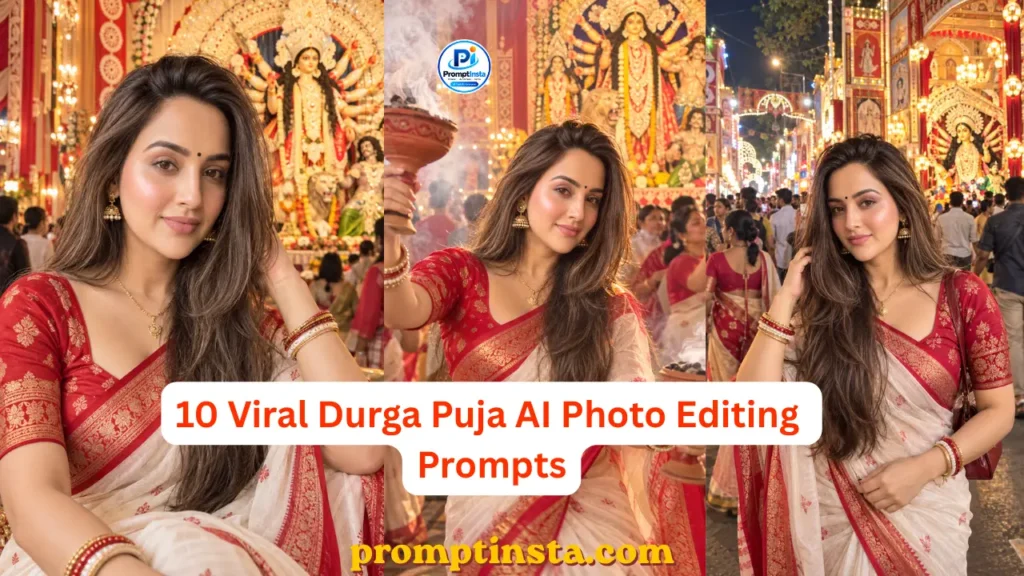

Durga Puja has a charm that is hard to capture in an ordinary photo. The beautifully decorated pandals, glowing lights, Maa Durga idols, traditional outfits, dhak beats, and festive crowds can turn even a simple moment into a memorable picture. But getting that perfect festive photo is not always easy – you may not have the right location, outfit, timing, or someone available to take the picture.
This is where AI photo editing can make things interesting. With the right prompt, you can transform a regular photo into a realistic Durga Puja scene without changing the person completely. You can place yourself in front of a beautifully decorated pandal, create a traditional Bengali festive look, add the warm atmosphere of a night celebration, or even recreate a candid dhunuchi dance moment.
In this guide, we have put together 10 different Durga Puja AI photo editing prompts for 2026, with each prompt designed around a different scene or mood. Instead of repeating the same portrait with a slightly different background, the ideas cover traditional, candid, cinematic, couple, street, and devotional-style photos.
You will also find practical tips for choosing the right photo, keeping your facial features natural, matching the lighting with the new background, and fixing common problems when an AI-generated image does not look quite right. Simply choose the style you like, copy the prompt, upload your photo, and adjust the details to create your own festive version.
10 Durga Puja AI Photo Editing Prompts
There is more than one way to create a Durga Puja photo with AI. You might want a traditional pandal portrait, a candid festival moment, a colorful night scene, or a photo that focuses more on your outfit and overall festive look.
That is why the prompts below are not simply different versions of the same idea. Each one is built around a different Durga Puja setting, mood, or photography style. You can use them as they are or change the outfit, background, pose, lighting, and other details to match the photo you have in mind.
For the most natural result, start with a clear original photo where your face and main features are easy to see. After generating the image, check the face, hands, clothing, lighting, and background details before choosing the final version.
1. Traditional Durga Puja Pandal Portrait
If you want your photo to look like it was taken during an actual Durga Puja celebration, a beautifully decorated pandal is one of the easiest scenes to start with. This style works especially well for a single-person portrait where you want the festive surroundings to be visible without taking attention away from your face.
The idea is to keep the person natural and place them in a detailed pandal setting with warm decorative lights, flowers, subtle background visitors, and Maa Durga’s idol at a respectful distance. The lighting should also fall naturally on the subject so the edited background does not look pasted behind the original photo.
Transform the uploaded photo into a realistic Durga Puja portrait. Keep the person's facial identity, facial structure, skin tone, hairstyle, and natural expression unchanged. Place the person naturally inside a beautifully decorated traditional Durga Puja pandal in the evening. Add warm festive lights, marigold flowers, subtle decorative elements, and a detailed Maa Durga idol in the background at a natural distance. Keep the pandal authentic and elegant rather than overly decorative. Match the lighting and shadows on the person with the surrounding environment, maintain realistic skin texture, natural body proportions, and believable depth of field. Add a few softly blurred visitors in the background to create the feeling of a real Puja celebration. The final image should look like a genuine photograph taken at a Durga Puja pandal, not an artificial or heavily edited image.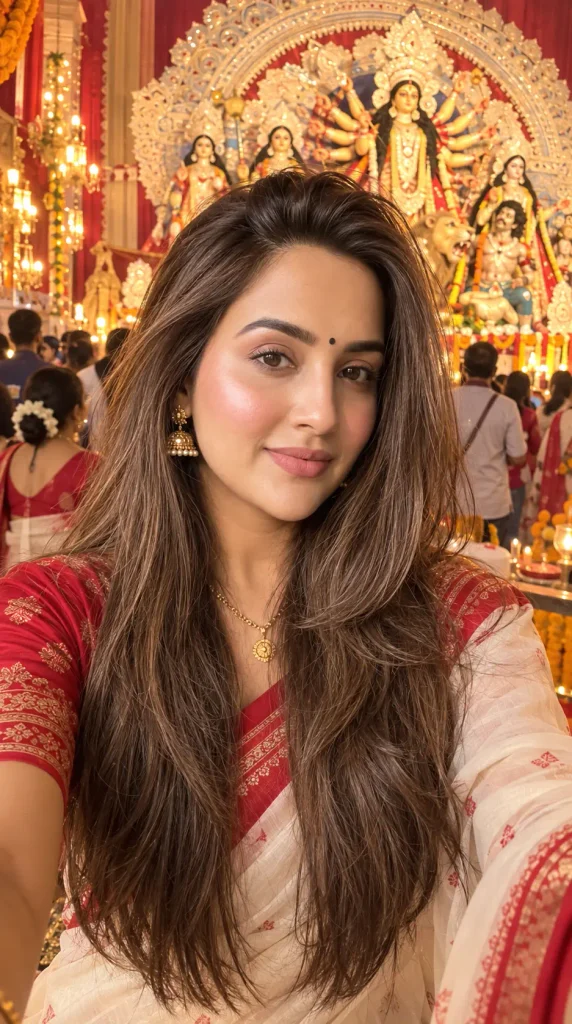
Tip: If the original photo has strong sunlight from one side, avoid placing it into a scene with completely different lighting. Matching the direction and softness of the light can make a noticeable difference in the final result.
2. Red-and-White Bengali Festive Look
Red and white instantly bring a traditional Bengali feel to Durga Puja photos. This prompt is a good choice if you want the festive outfit to be the main focus rather than a large pandal or crowded background.
Edit the uploaded photo into a realistic traditional Bengali Durga Puja portrait. Preserve the person's exact facial identity, natural skin tone, facial features, hairstyle, and overall appearance. Dress the person in an elegant traditional Bengali outfit with a classic red-and-white color combination, keeping the clothing realistic and naturally fitted to the body. Add subtle traditional jewellery and simple festive details without making the styling excessive. Place the person in a beautifully decorated Durga Puja setting with soft warm lights, fresh flowers, and a tasteful festive background. Keep the pose relaxed and natural, with realistic hands, fabric folds, skin texture, and facial expression. Use soft, balanced lighting that matches the environment and create a shallow natural depth of field. The final photograph should feel like an authentic festive portrait taken during Durga Puja rather than an overly edited AI image.3. Dhunuchi Dance Candid Photo
Transform the uploaded photo into a realistic candid Durga Puja dhunuchi dance scene. Preserve the person's exact facial identity, facial structure, skin tone, hairstyle, and recognizable appearance. Show the person naturally participating in dhunuchi dance during a festive Puja celebration, holding a traditional dhunuchi with a graceful and believable body posture. Add soft white incense smoke rising naturally around the dhunuchi, warm pandal lights, subtle flower decorations, and a lively but realistic background of people enjoying the celebration. Capture a genuine moment of movement rather than a stiff studio pose. Keep the face sharp and recognizable while allowing a very subtle sense of natural motion in the clothing and surrounding smoke. Match the lighting on the person with the warm festival environment, maintain realistic skin texture, correct hand and finger anatomy, natural fabric folds, and believable shadows. The final image should look like an authentic photograph captured during a real Durga Puja celebration.4. Maa Durga Idol Evening Portrait
Edit the uploaded photo into a realistic evening portrait taken during Durga Puja. Keep the person's exact facial identity, facial features, skin tone, hairstyle, and natural appearance unchanged. Place the person naturally in front of a beautifully decorated Maa Durga idol inside an elegant Puja pandal. The idol should remain clearly visible in the background but at a respectful distance, with traditional flowers, soft lamps, subtle decorative elements, and warm ambient lighting surrounding the scene. Keep the person's original expression natural and their body proportions accurate. Match the light falling on the face and clothing with the warm light coming from the Puja decorations. Add realistic shadows, natural skin texture, detailed fabric, and a gentle background depth of field. Keep the overall composition peaceful and authentic, as if the photograph was taken naturally during an evening Durga Puja visit rather than created with heavy digital effects.5. Kolkata Night Pandal Portrait
Transform the uploaded photo into a realistic nighttime Durga Puja portrait in Kolkata. Preserve the person's exact facial identity, facial structure, natural skin tone, hairstyle, and recognizable appearance. Place the person naturally outside a beautifully illuminated Durga Puja pandal at night, surrounded by tasteful decorative lights and subtle festive street activity. Include a detailed pandal entrance in the background with warm and colorful lights, while keeping the main subject clearly separated from the crowd. Use realistic night photography with soft ambient illumination on the face, natural shadows, gentle light reflections, and authentic depth of field. Add a few softly blurred visitors in the distance rather than an overcrowded scene. Keep the person's clothing, body proportions, hands, and facial expression natural. The final image should look like a real handheld portrait captured during Kolkata's Durga Puja celebrations at night, with realistic exposure and believable light falloff.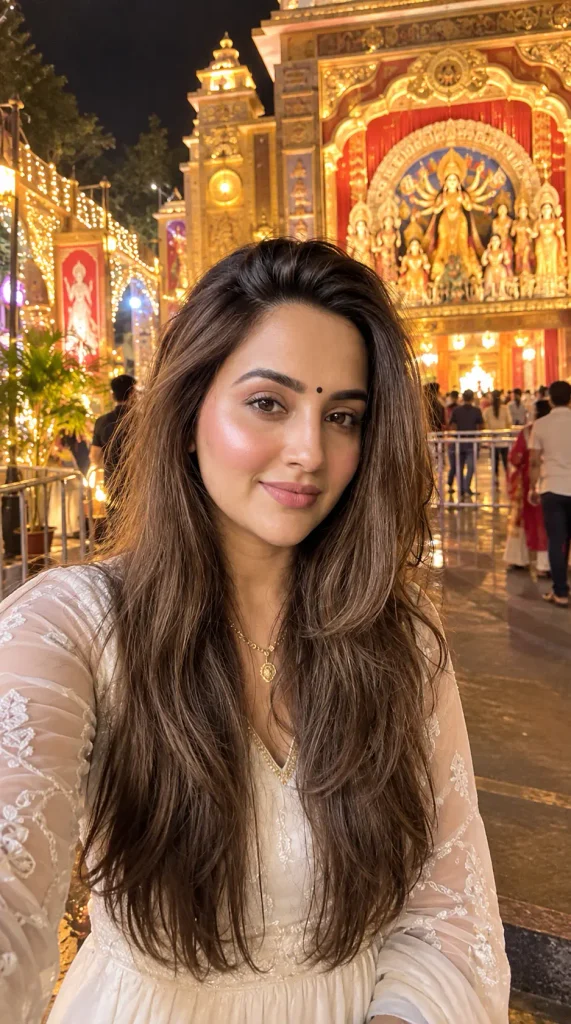
6. Sindoor Khela Inspired Festive Portrait
Transform the uploaded photo into a realistic Bengali festive portrait inspired by Sindoor Khela during Durga Puja. Preserve the person's exact facial identity, facial structure, natural skin tone, hairstyle, and recognizable appearance. Dress the person in an elegant traditional red-and-white Bengali saree with realistic fabric texture and subtle traditional jewellery. Add a natural touch of sindoor on the forehead and hair parting without exaggeration. Place the person in a decorated Durga Puja setting on Dashami, with flowers, warm festive lights, and a few softly blurred people participating in the celebration in the background. Capture a candid, joyful expression and natural body posture rather than a staged fashion pose. Maintain realistic skin texture, accurate hands and fingers, natural fabric folds, believable shadows, and lighting that matches the surrounding environment. Keep the overall scene respectful, authentic, and photographic, with a warm festive atmosphere and realistic depth of field.A Small Detail Makes a Big Difference
The sindoor should look like part of the original photograph, not like a bright red mark added afterward. Ask the AI for subtle, naturally distributed sindoor and keep the rest of the makeup and skin texture realistic.
For a more candid result, you can also ask for a slightly busy background with people, flowers, and festive activity kept softly out of focus. This gives the image the feeling of a genuine Dashami celebration without taking attention away from the subject.
7. Durga Puja Couple Pandal Portrait
Transform the uploaded photo into a realistic Durga Puja couple portrait. Preserve the exact facial identity, facial features, natural skin tone, hairstyle, and recognizable appearance of both people. Place the couple together inside a beautifully decorated Durga Puja pandal during the evening. Dress them in elegant traditional Indian festive outfits with complementary colors and realistic fabric details. Create a natural interaction between them, such as standing close together with a relaxed smile or looking at each other during the celebration, without making the pose appear overly staged. Add warm pandal lights, flowers, subtle decorative elements, and a softly blurred Maa Durga idol in the background. Keep both faces sharp and correctly proportioned, with natural hands, realistic body proportions, authentic skin texture, and clothing folds. Match the lighting on both subjects with the surrounding environment and use a realistic depth of field. The final photograph should feel like a genuine couple photo taken during Durga Puja, warm and festive without looking excessively edited.8. Peaceful Morning Pushpanjali Portrait
Transform the uploaded photo into a realistic morning Durga Puja portrait during Pushpanjali. Preserve the person's exact facial identity, facial structure, natural skin tone, hairstyle, and recognizable appearance. Place the person inside a traditional Puja setting during the morning, with soft natural daylight entering the space, fresh flowers, subtle festive decorations, and a Maa Durga idol visible naturally in the background. Dress the person in an elegant traditional Indian outfit suitable for a morning Puja. Keep the expression calm and genuine, with a relaxed posture and natural body proportions. Use soft daylight, realistic shadows, natural skin texture, detailed fabric, and gentle depth of field. Avoid excessive colors, artificial glow, dramatic effects, or an overcrowded background. The final image should feel like a real photograph captured during a peaceful morning Durga Puja celebration.9. Durga Puja Street and Pandal-Hopping Photo
Transform the uploaded photo into a realistic candid street photograph during Durga Puja in Kolkata. Preserve the person's exact facial identity, facial features, natural skin tone, hairstyle, and overall appearance. Place the person naturally walking through a decorated Puja street surrounded by illuminated pandal entrances, subtle festive decorations, flower arrangements, and a realistic evening crowd. Give the subject a relaxed, natural walking posture rather than a formal pose, as if the photograph was captured while exploring different pandals. Add realistic street lighting, gentle reflections, natural shadows, and a moderate depth of field. Keep background visitors slightly softer than the main subject but detailed enough to create a genuine sense of activity. Maintain accurate body proportions, realistic hands and clothing movement, natural skin texture, and believable lighting across the entire scene. The final image should look like an authentic candid travel photograph from a Durga Puja evening, not a staged studio portrait.10. Cinematic Grand Durga Puja Portrait
Transform the uploaded photo into a highly realistic cinematic Durga Puja portrait captured during a grand evening celebration. Preserve the person's exact facial identity, facial structure, natural skin tone, hairstyle, and recognizable appearance without changing their features. Place the person naturally in the foreground of a large, beautifully illuminated Durga Puja pandal, with a detailed Maa Durga idol visible deeper in the scene. Add warm decorative lights, traditional flowers, subtle festive elements, and a naturally distributed crowd in the background. Use realistic cinematic photography with balanced warm and cool lighting, natural shadows, believable reflections, detailed skin texture, accurate body proportions, and a gentle shallow depth of field. Keep the person's face clearly visible and naturally lit by the surrounding environment. Avoid excessive glow, artificial skin smoothing, extreme saturation, or unrealistic visual effects. The final image should resemble a professionally captured festival photograph while still looking like a genuine moment from a real Durga Puja celebration.How to Keep Your AI-Edited Durga Puja Photo Realistic
A good prompt is only one part of the process. The original photo and a few small editing details can make a big difference in how believable the final image looks. If you want your Durga Puja edit to feel like a real photograph rather than an obvious AI creation, pay attention to these six things.
1. Don’t Change the Face Unnecessarily
If you want the edited photo to still look like you, clearly tell the AI to preserve your facial identity and natural features. Avoid adding unnecessary instructions that change the shape of the face, eyes, nose, or jawline.
A simple instruction such as “preserve the person’s exact facial identity and natural facial features” can help keep the result closer to the original photo.
2. Keep the Original Skin Tone Natural
AI sometimes makes skin look unusually smooth, bright, or plastic, especially when the prompt contains words like “perfect skin” or “flawless complexion.”
Instead, ask for natural skin texture, realistic complexion, and subtle facial details. The skin should also respond naturally to the lighting in the new environment.
3. Keep the AI-Generated Crowd Believable
A crowded Durga Puja scene can add life to the photograph, but adding too many people often creates visual problems. Faces in the background may become distorted, people may overlap unnaturally, or the main subject can get lost.
Instead, ask for a small, naturally distributed background crowd and keep distant people slightly out of focus. This gives the image the atmosphere of a busy Puja celebration without making the background compete with the person in the foreground.
What to Change When Your AI Photo Looks Artificial
| Problem | What to Add or Change in the Prompt |
| The face looks different | Preserve the exact facial identity, facial structure, and recognizable features of the person. |
| The skin looks plastic | Maintain natural skin texture, realistic pores, subtle imperfections, and natural complexion. |
| The pandal looks fake | Create physically believable pandal architecture with realistic materials, proportions, lighting, and construction details. |
| The lighting doesn’t match | Match the direction, intensity, color, and softness of the light on the subject with the surrounding environment. |
| Hands or fingers look wrong | Maintain natural human hands, correct finger anatomy, realistic proportions, and natural hand positioning. |
| There are too many people | Add a small, naturally distributed background crowd with distant people slightly out of focus. |
Best Ai Tool For Making Durga Puja AI Photos
| ChatGPT | Click Here |
| Gemini Ai | Click Here |
| Leonardo Ai | Click Here |
| Grok Ai | Click Here |
Conclusion
Creating a good Durga Puja AI photo is not just about adding words like “8K” or “ultra-realistic” to a prompt. The real difference comes from making the scene, lighting, outfit, pose, and background work naturally together.
Choose a prompt from the list that matches the kind of photo you want, then make small changes to the outfit, setting, or mood to suit your original picture. If the first result is not quite right, try a couple of variations instead of changing everything at once. Often, a few simple adjustments are enough to turn an ordinary edit into a much more believable festive photo.

Pingback: Create Trending Diwali AI Photo Editing Prompts 2026 - Prompt Insta