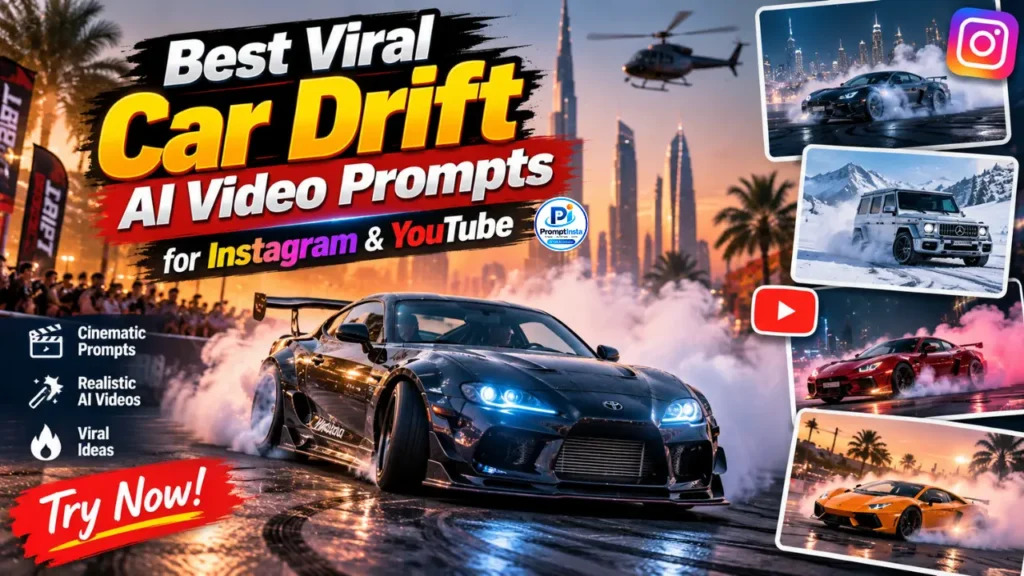

If you are a car lover, you must have a soft corner for car drifting. And when this drifting is created with AI, it looks next level. Recently on Instagram, YouTube Shorts, and Facebook Reels, you must have seen many realistic AI videos where cars are shown drifting in a cinematic way. These videos look so real that people stop scrolling, and many of them have crossed lakhs of views.
After watching such videos, you must have also felt like creating one yourself. But till now, you probably didn’t have the right prompts and Guide to make such car drifting AI videos from your mobile. That is why in today’s article, I am going to share the best prompts and simple tips with which you can easily create high-quality car drifting AI videos right from your phone.
Why This Car Drift AI Video Trend Is Going Viral
Do you Know what makes these car drift AI videos so special is the perfect mix of style and realism. A luxury car looks impressive on its own, but when it is combined with cinematic lighting and your real face, the video suddenly feels personal and high-quality. Viewers connect more with the content because it does not look like a random AI clip. Instead, it feels like a real short film starring you. This strong personal touch is the reason these videos get better engagement, more shares, and higher saves compared to normal AI videos.
Viral Car Drift AI Video Prompts 2026
Below you will find a complete and improved prompt that helps you create a realistic car drift AI video. First upload your clear photo, then paste this prompt into your AI video tool.
Important Identity Line (Use this at the start): Use my uploaded photo as the only face reference. Keep my exact facial structure, skin tone, hairstyle, eyes, nose, lips, expression and body proportions 100% same in every scene. Do not change or beautify my face. Maintain perfect face consistency throughout the video.
Scene 1: Stylish Side Pose with Car
Photorealistic cinematic side profile shot of the exact same person from the uploaded photo, leaning casually against a luxury white BMW M3 with subtle blue abstract graphics on the body. Strictly preserve the original face, facial structure, skin tone, hairstyle, expression and body proportions without any changes or beautification. The person is wearing a stylish beige trench coat over a clean white turtleneck sweater, looking calm and confident. Soft golden hour sunset lighting with warm tones, gentle haze in the air, and realistic light reflections on the car paint. Industrial urban background with concrete walls and soft bokeh. Shot on a high-end cinema camera, shallow depth of field, ultra-detailed textures, natural skin details, 8K resolution, highly realistic and cinematic look.Scene 2: Inside the Car View
First-person driver’s seat point-of-view inside a luxury white BMW M3. The digital instrument cluster is glowing clearly, the steering wheel features the M-badge, and the speedometer shows 0 km/h. Soft cinematic light is filtering through the windshield, creating a realistic and premium atmosphere. Highly detailed interior textures, natural reflections, sharp focus, photorealistic quality, 4K resolution.Scene 3: Front of the Car Close-up
Close-up cinematic shot of the front grille and sharp LED headlights of a luxury white BMW M3. Warm golden hour sunlight creating soft flares and realistic reflections on the clean white hood and chrome details. Moody industrial background with subtle depth, hyper-realistic car commercial style, ultra-detailed surfaces, photorealistic quality, 8K resolution.Scene 4: High-Speed Drift with Smoke
Dynamic cinematic action shot of a luxury white BMW M3 performing a high-speed drift on an industrial road. Thick white smoke is rising heavily from the rear tires as the car slides with controlled motion. Golden hour sunset lighting with dramatic shadows, realistic motion blur, and sharp details on the car body. Ultra-realistic physics, cinematic camera movement, photorealistic quality, high detail, 8K resolution.Scene 5: Aerial Donut Drift Shot
Dynamic top-down aerial drone shot of a luxury white BMW M3 with subtle blue graphics aggressively performing circular donut drifts on a weathered industrial concrete pad. Thick, billowing white smoke completely engulfs the rear tires, leaving deep, dark circular skid marks etched into the ground. Warm golden hour sunlight cuts through the smoke, casting long, dramatic shadows that emphasize the high-speed motion and raw power of the vehicle. Ultra-realistic physics, intense cinematic energy, sharp 8K resolution, and photorealistic textures capturing every detail of the spinning car and drifting smoke.Scene 6: Close-up with the Car
Intimate, medium close-up cinematic portrait of the exact same person from the uploaded photo, standing confidently next to the luxury white BMW M3. Strictly preserve the original facial structure, skin tone, hairstyle, eyes, and body proportions without any AI beautification. The person is wearing the signature stylish beige trench coat and clean white turtleneck, holding a serious, magnetic expression as warm golden hour light highlights natural skin textures. The sleek body of the BMW is visible in the smoothly blurred background with hyper-realistic cinematic lighting, 8K resolution, and ultra-detailed fabric textures.Scene 7: Walking Away Shot
Epic wide cinematic shot of the exact same person walking away from the camera in slow motion down an abandoned industrial road, wearing the flowing beige trench coat. In the background, the white BMW M3 sits aggressively as thick, realistic white smoke from a recent drift slowly dissipates into the golden air. Dramatic sunset lighting creates a stunning cinematic rim-light effect while maintaining perfect visibility of the person's exact body proportions and clothing movement. Shot on a high-end cinema lens with atmospheric haze, hyper-realistic environmental details, and stunning 8K photorealistic quality.How to Use Ai Car Drift Prompt
Ready to make your awesome car drift video. It’s super easy just follow these simple steps like a fun recipe:
- Step 1: Pick a clear selfie. First, upload a nice, bright photo of yourself into your AI video maker like Gemini.
- Step 2: Lock in your face. Copy and paste the “Identity Line” right at the very beginning. This acts like a magic rule that tells the AI to keep your face looking exactly like you!
- Step 3: Build it piece by piece. Copy and paste one scene prompt at a time. Let the AI create your mini-clips one by one.
- Step 4: Put the puzzle together. Once the AI finishes making all the short clips, open any free video editing app on your phone and stick them together in the right order.
- Step 5: Add cool music. Before you post it online to Reels or Shorts, add a fun, trending song to make it extra exciting.
My Top Tips to Get the Best Results
Want your video to look completely real and amazing? Keep these secret tricks in mind:
- Find good lighting: Always start with a photo where the light shines nicely and evenly on your face. Avoid dark shadows or blurry pictures.
- Make it all at once: Try to create all your scenes in one sitting without closing the AI app. This helps the computer remember your style so the whole video matches perfectly.
- Match your outfit: Make sure your character’s clothes and the background vibe stay the same in every clip. It helps the video flow together like a real movie.
- Don’t be afraid to try again: If your face looks a little funny or different in one of the clips, don’t worry! Just click the button to “regenerate” or make that specific scene again until it looks just right.
Final Thoughts
Creating your very own viral car drift video is easier than ever! You don’t need expensive cameras, a real race track, or a fancy sports car. All you need is your imagination, a good selfie, and these simple prompts to make a mini-movie that looks just like a real car commercial.
Remember to have fun with the process. AI is like magic, but sometimes it takes a few tries to get the perfect shot. Take your time, follow the easy steps, and don’t be afraid to hit the “regenerate” button until it looks exactly the way you want.
Now go ahead, put your awesome video together, add some cool music, and share it with the world! We can’t wait to see what you create. Don’t forget to leave a comment below if you have any questions, and tag us when your masterpiece goes viral. Happy creating.
Read Also: Instagram Trending Petrol Pump AI Photo Editing Prompt

Pingback: Instagram Trending Petrol Pump AI Photo Editing Prompt | Night Petrol Pump Edit in ChatGPT - Prompt Insta