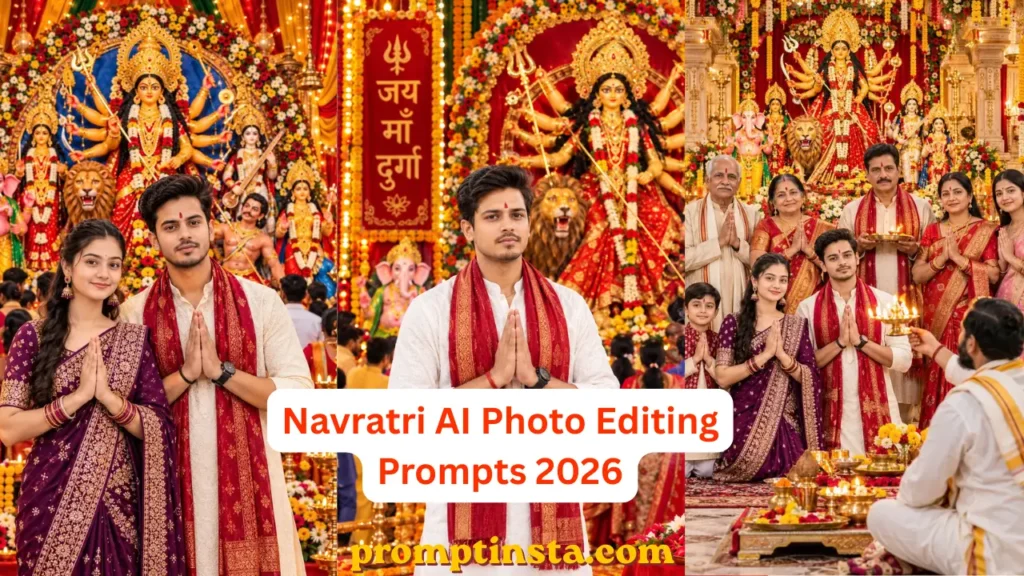

Hey friends! Navratri is starting on October 11, 2026, and people eagerly wait all year for this holy festival of Goddess Durga. During these nine days, we celebrate Durga Puja with full devotion. Maa Durga destroys all negative energies and purifies the earth with her divine power, making it a deeply spiritual and pure time for all Sanatanis. During this beautiful festival, people love sharing photos on social media while doing Maa Durga’s puja or attending the aarti. Whether they are with their family, their wife, or the younger generation celebrating with their partners, everyone wants to post perfect festive pictures.
Because of this, Navratri AI Photos are heavily trending right now! By using AI, you can easily create highly realistic and beautiful festival images with your loved ones without needing a professional photoshoot. This process becomes super easy with Navratri AI Photo Editing Prompts. These ready-made prompts already have all the details needed for a high-quality picture. You just need to paste the prompt along with your photo into ChatGPT, Gemini, or your favorite AI tool, and your studio-like Durga Puja AI photo is ready in seconds.
The best part is that you can completely customize the clothes, colors, and styles according to your own choice. So, today in this post, I am share with you 7 Best Navratri AI Photo Editing Prompts. Whether you are single, want a family photo, or want to create a beautiful picture with your wife or partner, these prompts will help you generate the perfect image. Let’s get started!
Why Navratri Festival is So Special for Bharat?
You Know navratri is not just a festival it is the heartbeat of Bharat. For nine days and nights, the entire country comes together to celebrate the ultimate victory of good over evil. During this holy time, we worship the nine powerful forms of Maa Durga, seeking her blessings for strength, peace, and happiness. Even My Family Already Started Planning for this Navratri.
Also, the streets light up, temples echo with devotional aartis, and the whole atmosphere feels incredibly pure and positive. Today’s young generation is also deeply connected to these Sanatani roots. They love dressing up in vibrant traditional outfits, fasting with devotion, visiting pandals with friends and family, and capturing these special moments for social media. It is a beautiful time when deep faith meets joyful celebration, bringing families and the whole country closer together.
Why Navratri AI Photos Are Trending 2026
Have you ever tried to click the perfect photo in a crowded Durga Puja pandal? If yes, you know it is really tough. Because sometimes the lighting is bad, the background is too crowded, or maybe we just don’t have that perfect traditional outfit ready for the day.
This is exactly why Navratri AI Photos have become a massive trend right now. Everyone wants to share beautiful, premium-looking festive pictures on their Instagram feed, Facebook, Twitter (X) and WhatsApp status, but not everyone has the time or budget to hire a professional photographer. Also, With AI all these problems are solved in seconds. You don’t need an expensive DSLR camera or a grand location. Using AI photo editing, you can generate a picture where you are standing in front of a stunning Maa Durga idol, holding an aarti thali, and wearing a beautiful Lehenga or Kurta.
Trending 7 Navratri AI Photo Editing Prompts 2026
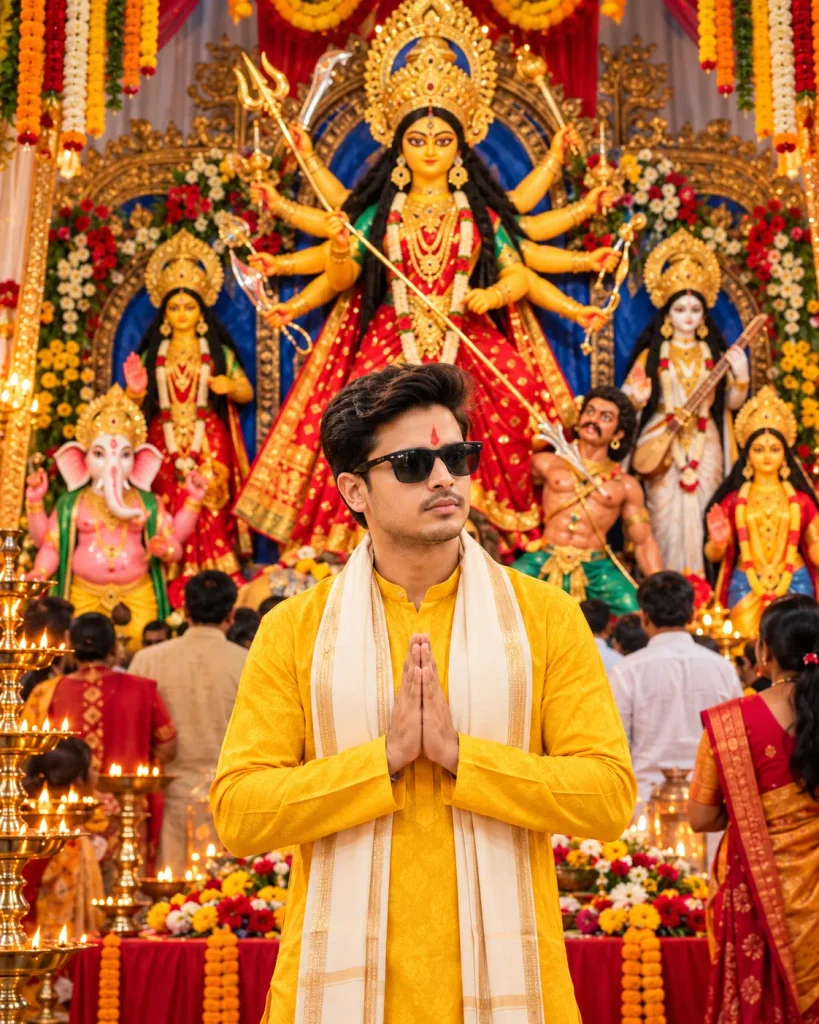
Use my uploaded photo as the exact face identity reference. Preserve my real facial features, face shape, skin tone, hairstyle, and natural appearance. Create an ultra-realistic, premium devotional portrait of me standing in the foreground with folded hands in a respectful Namaste pose, wearing an elegant bright yellow traditional kurta, a cream-gold stole, stylish sunglasses, and a realistic red tilak. Behind me, create a grand, highly detailed Maa Durga Puja pandal featuring a magnificent multi-armed Maa Durga idol in a red-and-gold saree, ornate golden crown, traditional ornaments, beautifully decorated idols of other deities, colorful flowers, marigold garlands, glowing brass oil lamps, and devotees in festive traditional clothing. Use rich festive colors, warm golden lighting, realistic shadows, natural human skin texture, lifelike facial details, sharp focus, and professional DSLR photography. My face must look like a real human, not CGI or plastic, with accurate facial identity and natural body proportions. Keep me clearly visible in the center, with Maa Durga prominently visible behind me. Vertical 4:5 composition, 1080 × 1350, optimized for Instagram. No text, no watermark, no blurry face, no distorted hands, no artificial skin.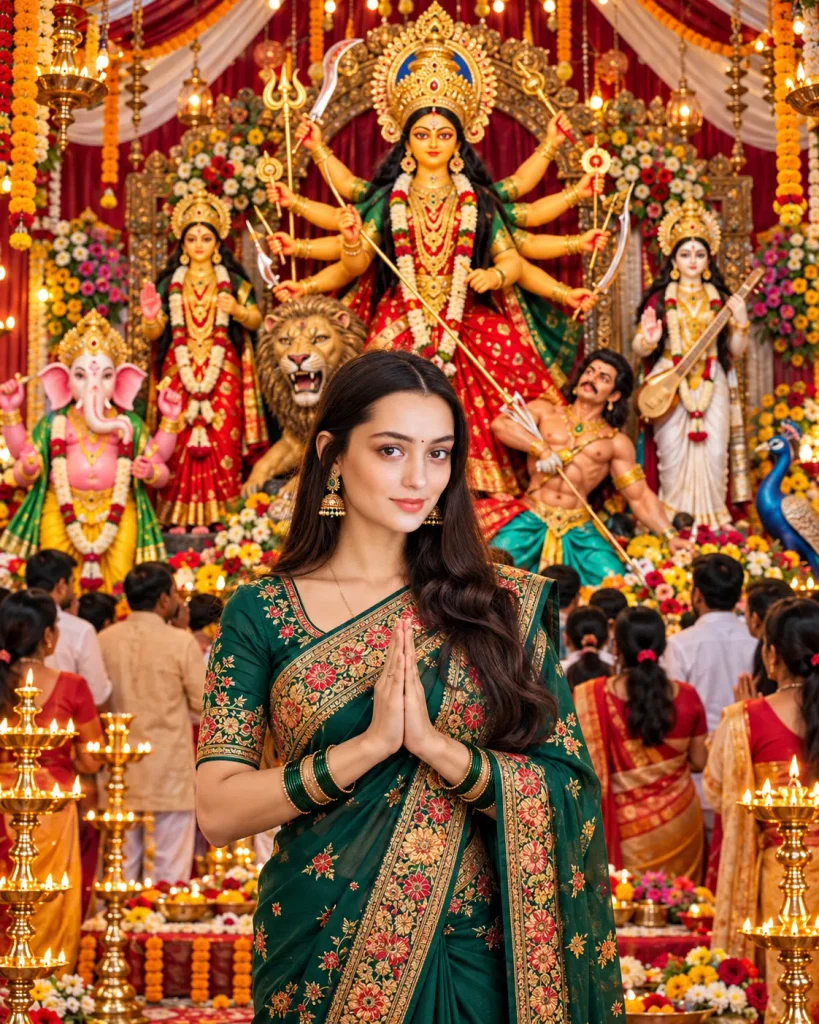
Use my uploaded photo as the exact face identity reference. Preserve my facial structure, skin tone, eyes, nose, lips, and natural features. Create a stunning, photorealistic portrait of me standing in the center with hands joined in a respectful Namaste pose, wearing an elegant deep emerald-green saree with intricate multicolored floral embroidery and a rich gold border, matching traditional blouse, gold jhumka earrings, bangles, and a small bindi. Keep my natural hairstyle and realistic human appearance. Behind me, create a magnificent Maa Durga Puja pandal featuring a grand multi-armed Maa Durga idol in a red-and-gold saree, an ornate golden crown, beautifully decorated idols of Lord Ganesha, Goddess Lakshmi, Goddess Saraswati, and Kartikeya, a majestic lion, colorful flowers, marigold garlands, glowing brass diyas, traditional decorations, and devotees in festive attire. Use rich festive colors, warm golden lighting, realistic shadows, natural skin texture, lifelike facial details, sharp focus, and professional DSLR photography. Keep my face clearly visible and naturally blended into the scene. Vertical 4:5 composition, 1080 × 1350, optimized for Instagram. No text, no watermark, no plastic skin, no artificial CGI look, no blurry face, no distorted hands, no extra fingers.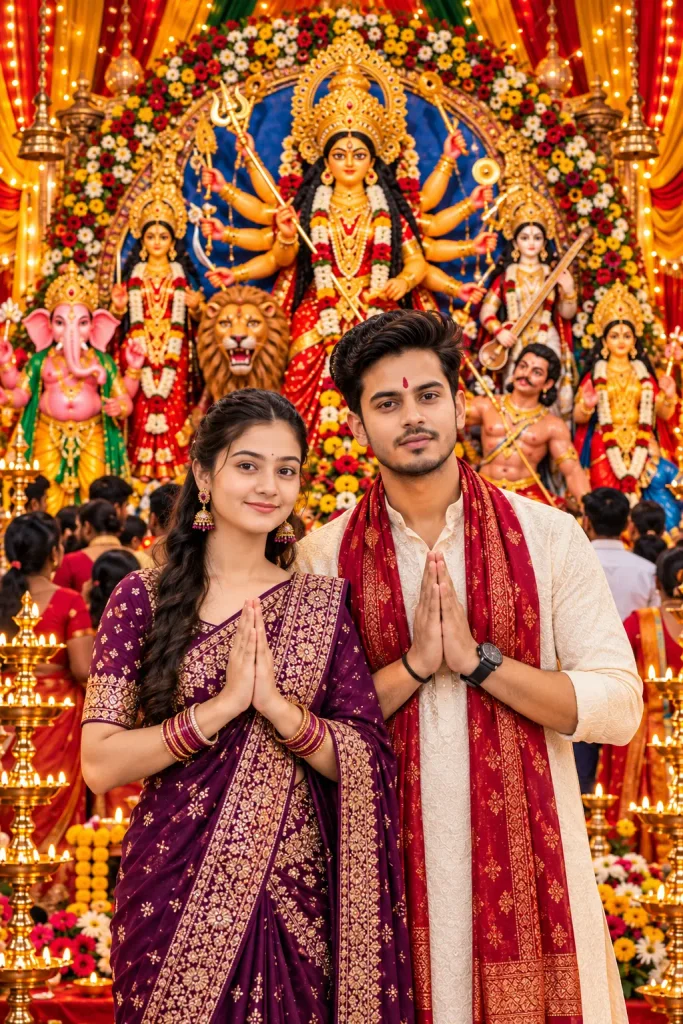
Use my two uploaded photos as exact face identity references: Photo 1 for the girl and Photo 2 for the boy. Preserve both individuals’ facial features, face shape, skin tone, hairstyle, and natural identity. Create a premium, photorealistic portrait of the couple standing side by side in the foreground, both looking directly at the camera with natural expressions and hands joined in a respectful Namaste pose. Dress the boy in an elegant ivory embroidered kurta, a rich maroon-and-gold stole, a subtle red tilak, and a wristwatch, with no sunglasses. Dress the girl in a beautiful deep-purple saree with intricate gold embroidery, matching blouse, traditional jhumka earrings, bangles, and a small bindi. Behind them, create a magnificent Maa Durga Puja pandal with a grand multi-armed Maa Durga idol in red and gold, an ornate golden crown, Lord Ganesha, Goddess Lakshmi, Goddess Saraswati, Kartikeya, a majestic lion, colorful flowers, marigold garlands, glowing brass diyas, decorative arches, warm fairy lights, and devotees in festive traditional clothing. Add rich festive colors, realistic depth, cinematic golden lighting, natural shadows, detailed fabrics, lifelike human skin texture, and professional DSLR photography. Both faces must remain sharp, realistic, and consistent with their respective uploaded photos. Natural anatomy, correctly formed hands and fingers, high resolution, premium color grading. Vertical 4:5 composition, 1080 × 1350, optimized for Instagram. No text, no watermark, no plastic skin, no artificial CGI look, no blurry faces, no distorted features.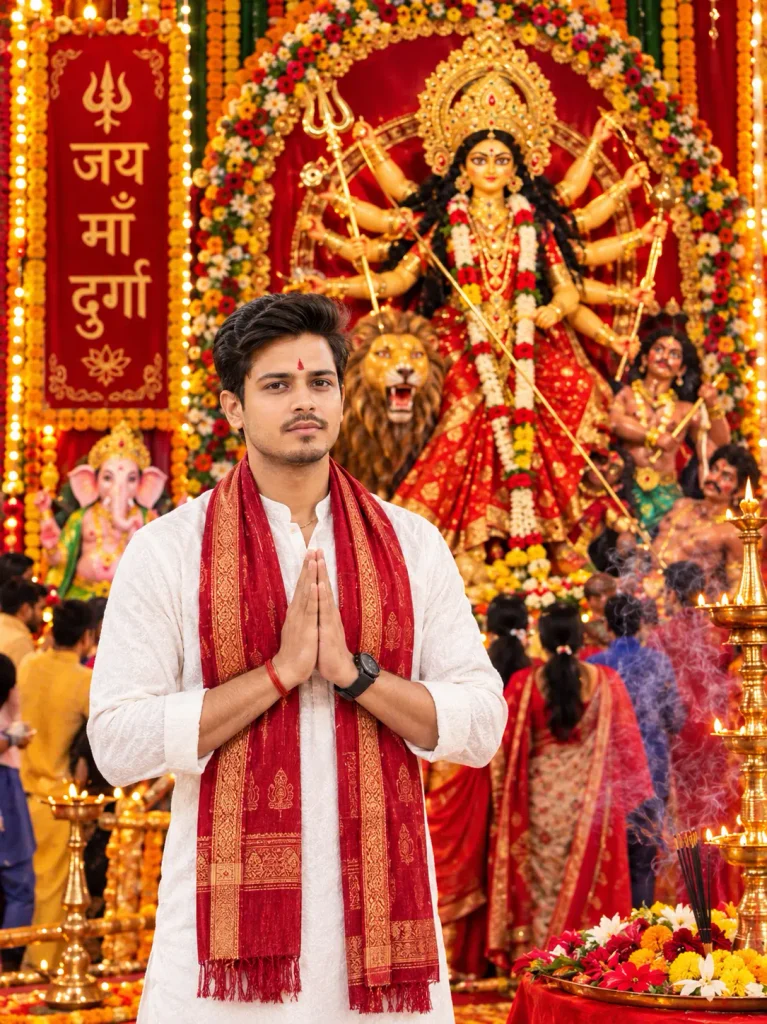
Use my uploaded photo as the exact face identity reference. Preserve my real facial features, face shape, skin tone, hairstyle, eyes, nose, and lips. Create a photorealistic portrait of me standing in the foreground with hands joined in a respectful Namaste pose, looking directly at the camera, wearing a premium white embroidered kurta, a rich red-and-gold traditional stole, a subtle red tilak, and a wristwatch. Do not add sunglasses. Behind me, create a magnificent Maa Durga Puja pandal with a grand multi-armed Maa Durga idol in a red-and-gold saree, an ornate golden crown, a majestic lion, Lord Ganesha, traditional deity decorations, colorful flower arrangements, marigold garlands, glowing brass diyas, incense smoke, festive devotees, and a decorative red banner reading “जय माँ दुर्गा”. Use rich red and gold colors, warm cinematic lighting, realistic shadows, intricate fabric details, natural human skin texture, lifelike facial features, and professional DSLR photography. Keep my face sharp, natural, and consistent with the uploaded photo. Realistic human anatomy, natural hands and fingers, high detail, premium color grading, no plastic skin or artificial CGI appearance. Vertical 4:5 aspect ratio, 1080 × 1350, optimized for Instagram. No watermark, no blurry face, no distorted features, no extra fingers.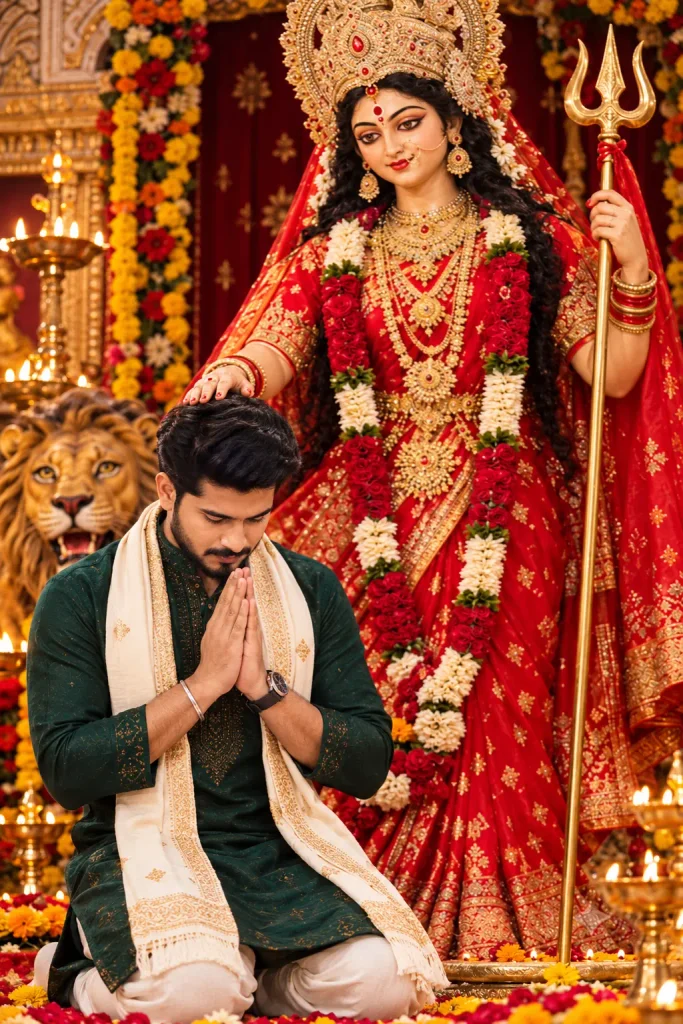
Use my uploaded photo as the exact face identity reference. Preserve my real facial features, face shape, skin tone, hairstyle, beard (if any), and natural appearance. Create an ultra-realistic devotional portrait of me kneeling humbly in Namaste pose with my head gently bowed and eyes looking downward, while Maa Durga lovingly places her blessing hand on my head. Dress me in a premium embroidered deep emerald-green kurta, ivory trousers, and a cream stole with elegant gold borders. Add a realistic wristwatch and subtle traditional details. Behind me, create a magnificent Maa Durga idol wearing a richly embroidered red-and-gold saree, an elaborate golden crown, traditional jewelry, flower garlands, and holding a trident. Include her majestic lion beside her, ornate temple decorations, red and golden floral arrangements, glowing brass diyas, incense smoke, and a warm festive devotional atmosphere. Compose Maa Durga prominently in the background and me in the lower foreground, matching the reference composition. Use cinematic golden lighting, realistic shadows, natural human skin texture, detailed fabric, lifelike facial features, professional DSLR photography, sharp focus, and high resolution. My face must closely match my uploaded photo and look genuinely human, not plastic or artificial CGI. Ensure natural anatomy and correctly formed hands and fingers. Vertical 4:5 aspect ratio, 1080 × 1350, optimized for Instagram. No sunglasses, no text, no watermark, no blurry face, no distorted features.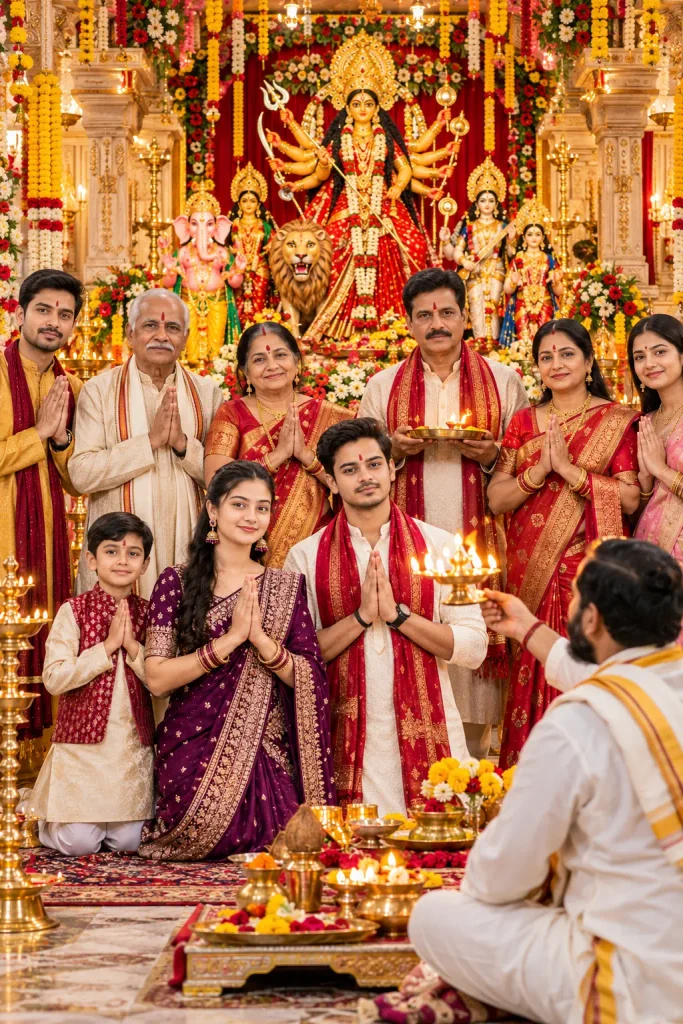
Use the uploaded photos as identity references for each family member. Preserve everyone's recognizable facial features, face shape, skin tone, hairstyle, and natural appearance. Create a beautiful, photorealistic multigenerational Indian family portrait featuring the user, mother, father, grandfather, grandmother, uncle, aunt, and children, arranging everyone neatly in balanced rows so every face is clearly visible. Set the scene inside a luxurious traditional Indian home temple with carved marble pillars, elegant gold detailing, a magnificent Maa Durga idol, beautifully decorated deity statues, red-and-gold drapes, fresh flowers, marigold garlands, glowing brass diyas, and a peaceful devotional atmosphere. Place the father and mother prominently near the center, holding a beautifully decorated brass aarti thali together. Position the other family members around and behind them with hands joined in Namaste. Include a traditionally dressed Hindu priest performing puja respectfully in the foreground, without blocking anyone's face. Dress everyone in coordinated but varied premium traditional Indian outfits, including elegant sarees, embroidered kurtas, sherwanis, and festive children's clothing in complementary jewel tones such as maroon, emerald green, royal blue, cream, and gold. Change clothing colors and designs from the uploaded photos. Everyone must face the camera directly with natural expressions. No sunglasses or eyeglasses on anyone. Use a straight-on, eye-level camera angle, full family group composition, realistic human skin texture, natural facial details, accurate body proportions, detailed fabrics, cinematic warm lighting, realistic shadows, and professional DSLR photography. Keep every family member sharp, recognizable, and naturally integrated into the scene. Make the image feel like a real premium family photograph, not artificial CGI. Vertical 4:5 aspect ratio, 1080 × 1350, optimized for Instagram. No text, no watermark, no cropped faces, no duplicate people, no distorted hands, and no extra fingers.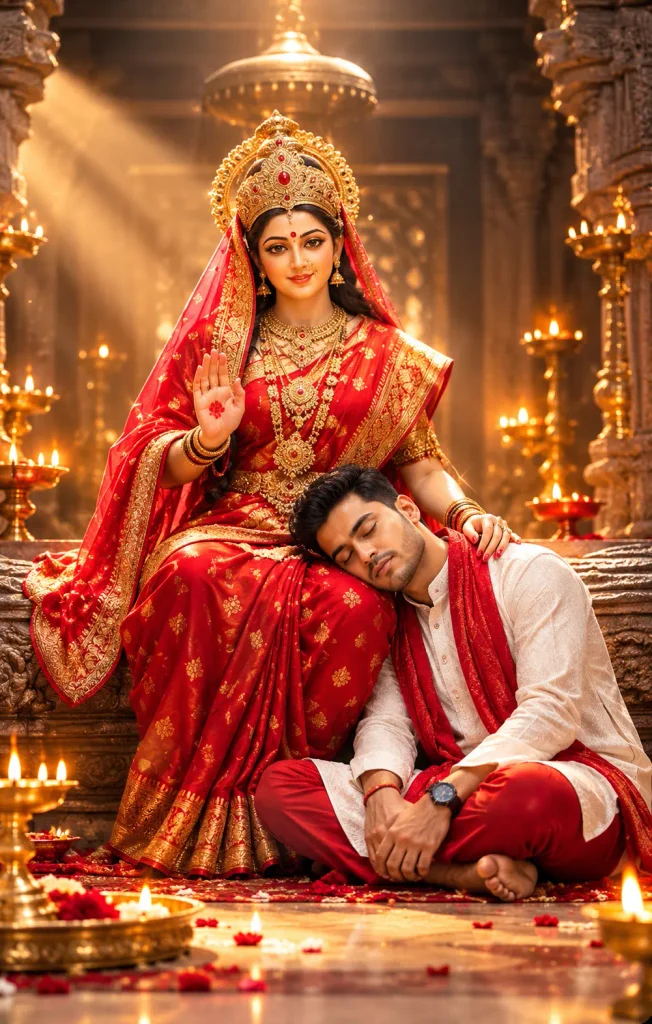
Use my uploaded photo as the exact face identity reference. Preserve my real facial features, face shape, skin tone, hairstyle, and beard (if present). Create a breathtaking, photorealistic devotional portrait of me sitting barefoot on the temple floor, peacefully resting my head on Maa Durga’s lap with my eyes gently closed and hands relaxed. Maa Durga sits gracefully on an ornate carved temple throne, wearing a magnificent red-and-gold embroidered saree, an elaborate jeweled golden crown, traditional gold jewelry, and a red veil. One of her hands gently blesses my head while the other is raised in a divine blessing gesture. Dress me in an elegant ivory embroidered kurta, rich crimson-red pajama, and a luxurious red stole. No sunglasses or eyeglasses. Keep my face closely matched to the uploaded photo, with natural proportions and realistic human skin texture. Create a grand ancient Indian temple interior with intricately carved stone pillars, a glowing golden canopy, rows of brass diyas, flower petals, incense smoke, warm golden sunbeams, subtle floating dust particles, and beautiful cinematic background bokeh. Use dramatic yet soft lighting, rich red and gold colors, detailed embroidery, realistic jewelry, natural shadows, sharp facial details, and professional DSLR photography. The final image must look like a real high-end devotional photograph with lifelike human skin, not plastic skin or cartoon CGI. Maintain accurate anatomy, natural hands and fingers, realistic body proportions, and a clean, balanced composition. Vertical 4:5 aspect ratio, 1080 × 1350, optimized for Instagram. No text, no watermark, no blurry face, no distorted features, no extra limbs or fingers.How to Create Navratri AI Photos Using These Prompts
If you think it is hard process so believe me it is very easy like 2 minutes Maggi because creating navratri ai photos is now very easy. You need a simple mobile/laptop and use either ChatGPT or Google Gemini. Here is the simple process:
- PlayStore Install ChatGPT app or search in google ChatGPT.
- SignUP with Gmail & Login
- Click on the plus (+) icon and select your photos.
- Upload your clear photo.
- Paste the same prompt.
- Click send and wait for the image to generate.
- Download the final photo.
If the first result is not perfect, you can generate it again. Just edit the prompt slightly or click generate once more. This way you can create beautiful Navratri photos for girls, boys, or couples easily.
My Pro Tips for Best Results
I have generated hundreds of AI photos, and let me tell you a secret—sometimes the AI can make silly mistakes! To help you get that perfect, flawless Navratri photo without wasting time, here are my top pro tips:
- Use a Clear, Simple Selfie: If your AI tool allows face-matching, always upload a clear, front-facing photo with good natural lighting. Avoid sunglasses, messy hair, or heavy Snapchat filters, otherwise, the AI will get confused.
- Be Specific with Indian Outfits: AI tools sometimes struggle with generic words like traditional dress. Instead use exact words in your prompt like Red Bandhani Saree, Yellow Silk Kurta or Heavy Kundan Jewellery. This gives a much richer and more authentic Indian look.
- Generate Images 2 to 3 Times: AI is smart, but it’s not perfect. Sometimes it messes up fingers or eyes. If your first result looks a little weird, don’t worry! Just hit the “Generate” button again. Usually, the second or third try gives the absolute best result.
- Set the Right Size: Where do you want to post. If you are making this for an Instagram Reel or WhatsApp Status, make sure to add the words vertical 9:16 size, 4:5 or 4:3 in your prompt. For a normal post, you can just use “square format”.
Follow these simple tips, and I promise your friends will definitely message you asking Wow which studio did you go to for this photoshoot and you say Promptinsta.com, I copy Master Prompts and Paste ChatGPT My Images Are Ready.
Conclusion
So friends, these were the 7 best Navratri AI Photo Editing Prompts to make your festival season even more special. As you can see, you really don’t need an expensive camera, a professional designer, or hours of editing to shine on Instagram and WhatsApp.
Just pick your favorite prompt from this list, add your own creative touch, and your stunning festive photo will be ready in seconds. Whether you are creating a solo portrait, a romantic couple picture, or a beautiful family memory, these prompts will give you that premium, realistic look.
I hope this guide helps you create some amazing AI pictures this festive season. Go ahead, try these out today! And please let me know in the comments below—which prompt did you like the most? If you found this article helpful, don’t forget to share it with your friends so they can create their own viral Navratri AI photos too.
Wishing you and your family a very Happy and Blessed Navratri! Jai Mata Di! 🙏✨

Pingback: 9 Days Navratri AI Photo Editing Prompts 2026