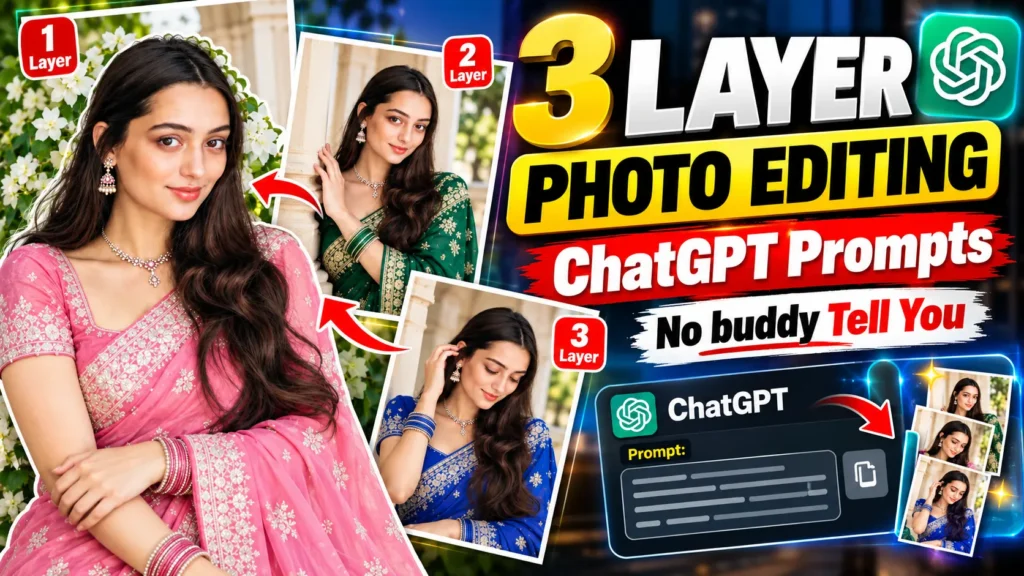

Have you seen those amazing 3-layer photos on social media and wondered how they are made? Looking at them, it feels like a professional photographer clicked them with an expensive DSLR camera on a high budget, and then an expert designer spent hours editing them into three beautiful layers with cool text.
You must have thought at least once, “I could probably never make an image like this.” You can let me know in the comments below, because honestly, when I first saw them, I felt the exact same way! I thought creating a 3 layer image would take too much hard work and money, and maybe I just couldn’t do it.
But you won’t believe that is just a myth! The reality is completely different. In this article, I am going to give you the exact 3 layer photo editing ChatGPT prompts. Using this, you won’t need expensive gear or years of editing practice. You can create these viral 3 layer photos in just a few seconds with a snap of your fingers. Are you ready. I m also Let’s get started!
Do You Know What Is a 3 Layer Photo?
A 3 layer photo is one picture that is split into three frames, stacked from top to bottom. Each frame shows the same person in a different pose or angle. A soft fade, mist, or torn-paper line sits between them.
It’s not video editing. It’s a photo collage. In the past, a photographer and a designer would make it. Now AI can build it from just one selfie. Usually, the three frames look like this:
- One face, always. You can tell it’s the same person in every part.
- A new mood each time. Maybe calm, then smiling, then a quiet look away.
- Smooth blending. There are no hard edges, so your eyes glide down the photo like you’re reading a short story.
Once you know these three things, you’ll start spotting the good ones and the not-so-good ones in your feed. And in a moment, you’ll see how little it takes to make one yourself.
What You Need Before You Start
Here’s something most people skip the AI doesn’t know your face. It only knows the photo you give it. So the photo you pick matters more than the prompt itself. Before you upload, ask yourself three quick questions:
- Can I see both my eyes clearly? If your face is half-hidden by hair, a cap, or sunglasses, the AI has to guess the rest.
- Is the light on my face? Light behind you, like a bright window at your back, turns your face into a dark shadow.
- Would a friend know it’s me? If yes, the AI will too.
No good selfie in your gallery so click a fresh photo in a minute. Stand facing a window, hold your phone at eye level, and relax your face. That’s it. No filter, no beauty mode, and no one else in the frame.
One last thing use your own photo, or a photo of someone who’s okay with it. It’s the right thing to do, and it keeps your account safe too.
3 Layer Photo Editing ChatGPT Prompts
Here’s the prompt. Copy it, paste it with your photo, and your image is ready:-
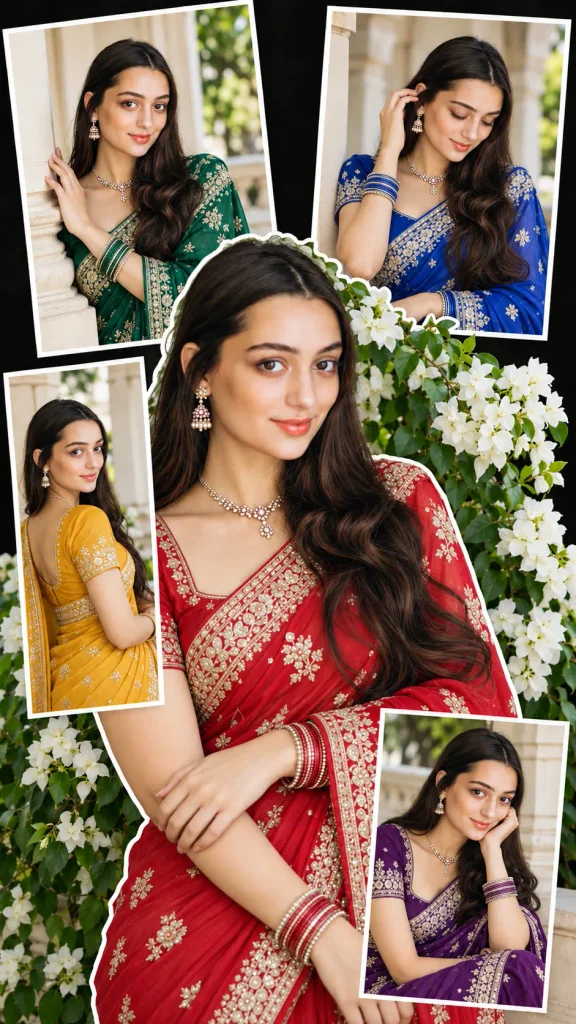
Use my uploaded face as the identity reference. Create a vertical 9:16 fashion photo collage with me wearing elegant sarees with matching blouses, a necklace, earrings, bangles, and long wavy dark hair. Make a large central cutout portrait of me in a rich red saree with a gold/silver embroidered border, in front of white flowers and green leaves, with a soft candid pose and a thin white sticker-style outline. Add four smaller framed photos around it near a cream-colored architectural column, each with a different saree colour: top left emerald green, top right royal blue, bottom left mustard yellow, bottom right deep purple. Give each frame a different natural pose. Use a black scrapbook-style background with white photo frames. Keep my face, facial features, skin tone, hairstyle, and identity exactly the same in every photo. Only the saree colour changes. Photorealistic, natural daylight, realistic skin and hands, elegant Indian fashion photography, high detail, no text or watermark.Cinematic Diagonal 3 Layer Photo Prompt
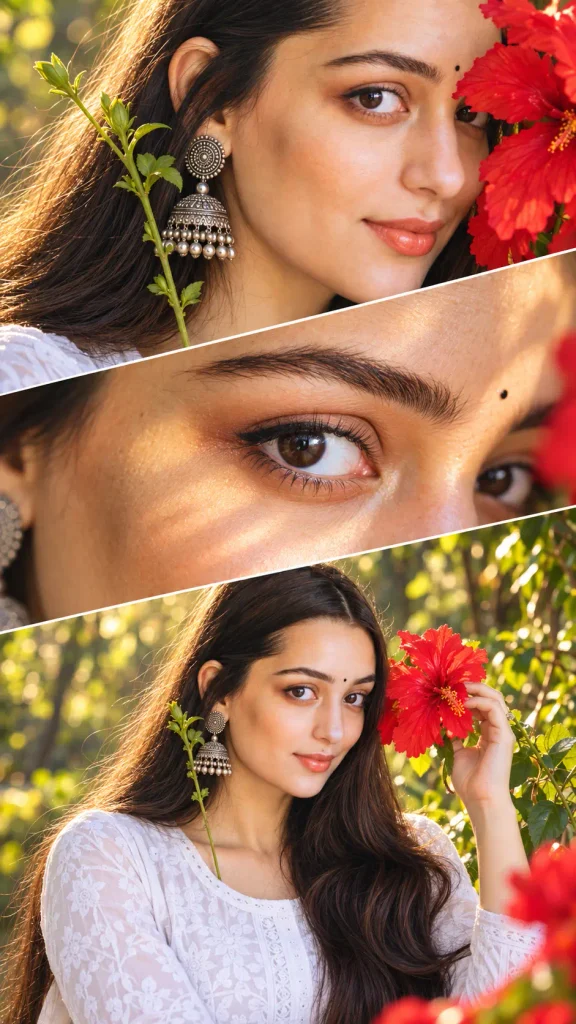
Use the uploaded reference photo as the primary face identity. Keep her exact face shape, skin tone, eyebrows, eyes, eyelashes, nose, lips, jawline, ears, hairline, and natural proportions. Do not beautify, slim, age, smooth, or restyle her. The same woman with the same face must appear in all three panels. Create an ultra-realistic cinematic three-panel diagonal collage in 9:16 vertical format, with slanted, slightly overlapping sections separated by thin white diagonal lines. Keep these details the same in every panel (where visible): long straight black hair, large antique oxidized silver jhumka with a circular spiral top and layered bells, small round black bindi, bold black kajal with soft smoky eyeliner, natural peach-coral lips, one bright red hibiscus flower, and a fresh green stem near the earring. Use the same warm golden sunlight from the same side in all panels. TOP PANEL: Extreme close-up of the side of her face, ear, and neck. The red flower petals softly cover part of her cheek. The jhumka and green stem are sharp and clearly visible. MIDDLE PANEL: Ultra-macro close-up of one dark-brown eye looking sideways, with the eyebrow, long curled lashes, kajal, bindi, and real skin texture. Soft golden light across the eye and upper face. BOTTOM PANEL: Upper-body portrait wearing a white chikankari kurti. She gently holds the red flower beside her face with natural, correctly shaped fingers. Soft, elegant, relaxed expression. Background: blurred lush green forest with creamy bokeh and golden-hour light through the trees. Shot like premium editorial DSLR photography, 85mm portrait lens (100mm macro for the eye panel), shallow depth of field, sharp focus on the eyes, warm natural colours, realistic skin pores, subtle film-like contrast. No text, no watermark. Negative prompt: different face, different woman, altered identity, beautified or smoothed skin, plastic skin, anime, illustration, cartoon, CGI, extra eyes, asymmetrical eyes, mismatched earrings, different hairstyle between panels, extra fingers, distorted hands, blurry face, low quality, text, watermark, logo.How to Make Your 3 Layer Photo in ChatGPT
You can easily create an impressive, attention-grabbing 3-layer photo for free using your mobile phone or laptop by following the steps given below. Follow each step carefully.
- Open the ChatGPT app (or chatgpt.com in your browser).
- Tap the plus (+) icon, then choose Photos.
- Add your selfie Wait until it finishes uploading.
- Copy your prompt On mobile, press and hold the prompt, then tap Copy.
- Paste the prompt in the message box and tap the send arrow.
- Wait 10 to 15 seconds. Your photo will appear on its own.
- Tap the download icon at the top to save it to your gallery.
If ChatGPT only replies with text, tap Create an image near the message box, then paste your prompt again.
Before you post, take a quick look at your result. Check three things first the face, 2nd the hands, and 3rd the earrings (or other small details). If one looks odd, send the same prompt once more. Small differences between tries are normal, and your second or third result is often the best.
How to Use Boys, Girls, and Couples these 3 layer prompts
You don’t need a new prompt for everyone. Use the same prompt, and change just one line to match your style.
- For boys: Add the outfit and the mood. Try: “Wearing a white oversized shirt and jeans, relaxed pose, hands in pockets.” Simple clothes and an easy pose make the photo look natural.
- For girls: Add the small details you want to keep. Try: “Keep my long hair, earrings, and soft smile the same in every frame.” Soft light also helps a lot here.
- For couples: Upload one clear photo with both faces visible. Then add: “Show both of us in every frame, with both faces exactly the same.” If one face keeps changing, try a closer photo where you stand side by side.
- Want more than three frames? Ask for one big center photo and four small ones around it, each in a different outfit colour. It’s a fun way to make your post stand out.
Pick one tweak, try it, and see what you like. That’s how you find your own style.
Common Problems and Quick Fixes
Sometimes the first result won’t look right and that’s totally normal. So before you give up just find your problem in the table and try the fix.
| Problem | Quick Fix |
| The face looks different | Use a sharp front-facing selfie and add this line: “keep my face exactly the same in every frame” |
| The hands look odd | Send the same prompt again or add “natural hands with five fingers” at the end |
| The background looks messy | Pick a photo with a plain wall or a blurred background |
| The fade between frames looks strange | Change one word like “mist” to “soft white fade” or “torn paper edge” |
| The outfit is wrong | Add one clear line like “wearing a white kurti in all frames” |
| The photo looks blurry or flat | Upload a higher quality photo and add “sharp focus and natural light” |
Which AI Tool Is Best for 3 Layer Photos
You can make a 3 layer photo in more than one app. They all work a little differently so here’s a quick guide to help you pick.
| AI Tool | Best For |
| ChatGPT | Beginners who want the easiest steps. Upload your photo and paste the prompt |
| Gemini | A free and simple way to try the same prompt and compare the result |
| Leonardo AI | People who want more control over style and small details |
| Midjourney | Artistic looks but it takes more practice to keep your own face |
If you’re just starting out use ChatGPT first. Then paste the same prompt into Gemini and see which one matches your face better. That’s the fastest way to find your favourite.
Free limits and plans change often so check each app’s current plan before you start. And don’t worry if one tool gives a odd result. Every app has its good days and bad days so just try again or switch tools.
Frequently Asked Questions
Q1: Can I make a 3 layer photo from just one photo.
Ans: Yes you can. One clear selfie is enough because the AI creates all three frames from it. Just make sure your face is sharp and the light is soft.
Q2: Is it free to make a 3 layer photo.
Ans: Many AI apps have a free option but the limits change often. So check the app’s current plan before you start. If you hit the limit you can wait a little and try again later.
Q3: Can I use the same prompt for a boy and a girl.
Ans: Yes you can. Just change the outfit line and the pose line so it matches your style.
Conclusion
Remember how we started? That photo that looked like it needed a pro photographer and a designer. Now you know it only needs one selfie and a smart prompt. You learned what a 3 layer photo is and how to pick the right selfie. You also learned how to build your own prompt and how to fix problems when a result looks off.
So here’s what to do next. Take a fresh selfie near a window and copy the prompt from this article. Paste it into ChatGPT and see what you get. If the first try isn’t perfect that’s okay. Change one small detail and try again.
Your first photo might surprise you. And if it does I’d love to hear about it so tell me in the comments below. Which style did you try first?
Read Also: Upcoming Trending Diwali AI Photo Editing Prompts 2026



Pingback: Trending AI Instagram Milestone Poster Photo Editing Prompts 2026 - Prompt Insta