

Hello my dear friends, I know you have seen many attractive AI couple images on social media. Now you must be thinking how can I create these couple images, what is the prompt and how can I make a couple photo prompt. so don’t worry, You don’t need to create any prompt yourself. In this article, I am giving you complete ready-to-use master AI couple photo editing prompts. Just copy them and paste them in Google Gemini AI, and your couple photo will be ready within seconds.
Here I am sharing 3 different Gemini couple photo prompts. You can copy them one by one, paste in Gemini, and download the image you like the most to post on social media. I request you to read the complete article carefully, because only copying and pasting is not enough. I will also explain the full process how to use these prompts, and how you can easily customize them if you want.
How to Create Couple Photos with Google Gemini AI
Creating these beautiful couple photos is very easy. You don’t need any editing skills. Just follow these simple steps:-
- Open Google Gemini on your mobile or computer.
- Upload a clear photo of the couple (or two separate photos of both people).
- Copy any one prompt from this article and paste it in the chat box.
- Click generate and wait a few seconds.
- Download the image you like the most.
That’s it. Your artistic couple photo is ready. If you want to change anything later (like background, clothes, or mood), you can simply tell Gemini in the same chat.
Read: Heartfelt Styles Trending Emotional Romantic AI Photo Prompts
3 Best Google Gemini AI Prompts for Couple Photos
1. Intimate High-Contrast Double Exposure Ai Couple Portrait Prompt
This style looks very artistic and emotional. It blends two moments of the couple into one beautiful frame.
Create an intimate, high-contrast, double-exposure-style portrait of the couple in the reference image, blending two distinct moments into a single frame. The primary layer features the couple in a full-length shot, standing close together on a subtly textured, sandy or studio floor against a dark, moody background. The woman is wearing an elegant olive-green, V-neck gown and simple dark sandals, her long, wavy brown hair flowing over her shoulders. The man is dressed in a white long-sleeve sweater and black trousers with dark dress shoes. They are looking at each other. In the overlaid image, they are gazing lovingly at each other, almost nose-to-nose, with the man gently cupping the woman's face. The lighting is dramatic and editorial, with a soft spotlight effect on the smaller, standing figures, contrasting sharply with the deep, dark shadows and the luminous, ethereal quality of the large, faded background image, creating a feeling of memory or deep connection. The image should have a rich, desaturated color palette with a focus on deep blacks and the subdued tones of the clothing.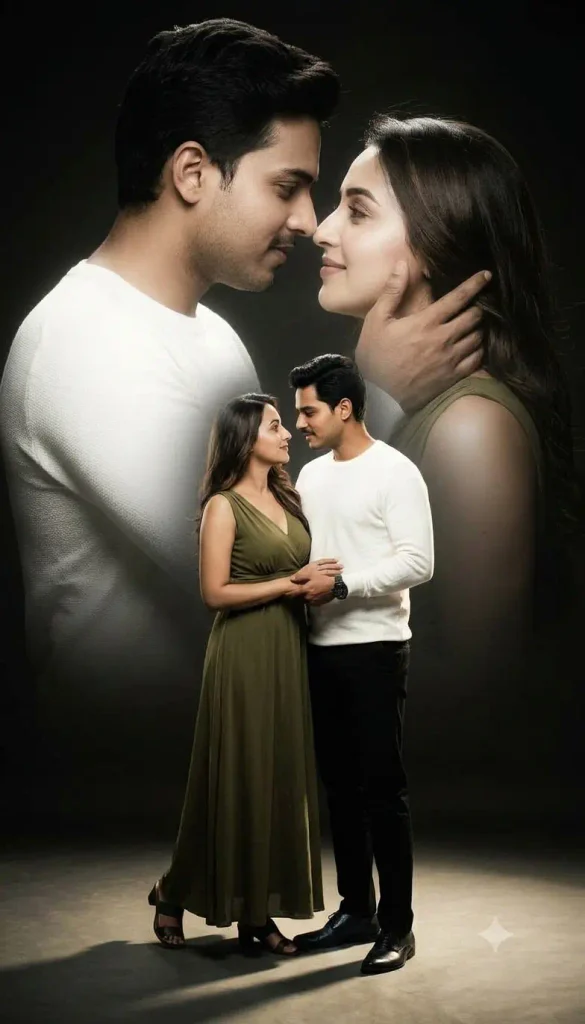
2. Golden Moonlight Double Exposure Couple Portrait Prompt
Create an intimate, high-contrast, double-exposure-style portrait of the couple in the reference image, blending two distinct moments into a single frame. The primary layer features the couple in a full-length shot, standing close together under a soft golden moonlight against a dark, dreamy night background. The woman is wearing an elegant soft cream-colored flowing gown with delicate details, and the man is dressed in a light beige open-collar shirt with dark trousers. They are looking at each other lovingly. In the overlaid image, a smaller version of the couple appears in all four corners of the frame, gently swinging together on a wooden jhula under the moonlight, creating a soft floating effect. The lighting is warm golden and romantic, with a soft spotlight on the main standing figures, contrasting with deep shadows and the luminous glow of the moon. The overall image should feel magical, emotional, and dreamy, with a rich warm color palette focused on soft golds, deep blacks, and gentle highlights.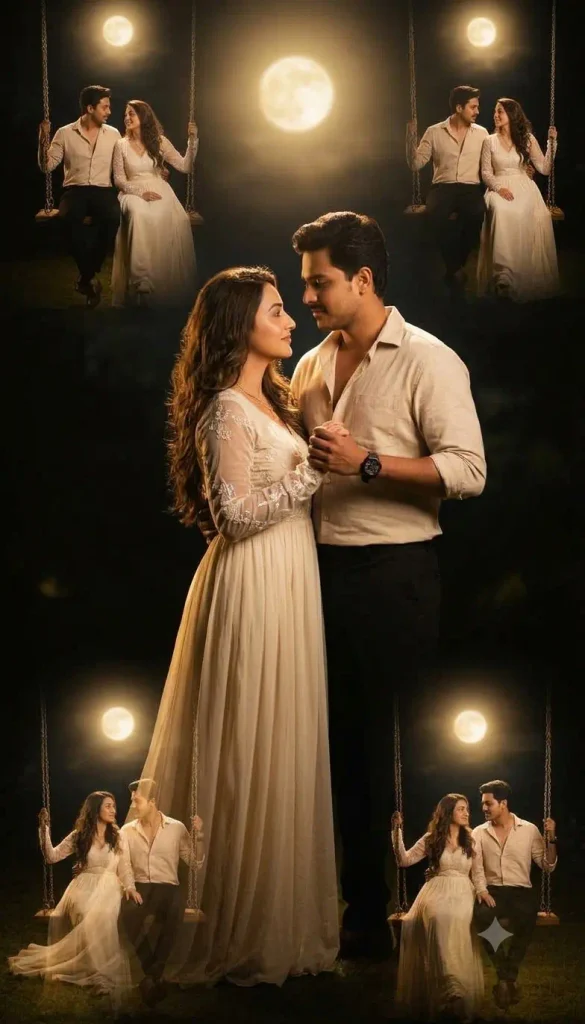
3. Soft Sunrise Memory Double Exposure Couple Portrait
Create an intimate, high-contrast, double-exposure-style portrait of the couple in the reference image, blending two distinct moments into a single frame. The primary layer features the couple in a full-length shot, standing close together on soft grass during early morning sunrise, with gentle golden light falling on them. The woman is wearing a light pastel pink flowing dress, and the man is dressed in a soft white shirt with light grey trousers. They are looking at each other with calm and loving expressions. In the overlaid image, a larger ethereal close-up of the couple appears in the background, softly faded, where the man is gently holding the woman’s hand near her face. Soft sunlight rays and a light mist create a dreamy atmosphere. The lighting is warm, natural, and glowing, with soft highlights and gentle shadows. The overall image should feel peaceful, romantic, and full of quiet emotion, with a soft pastel and warm golden color palette.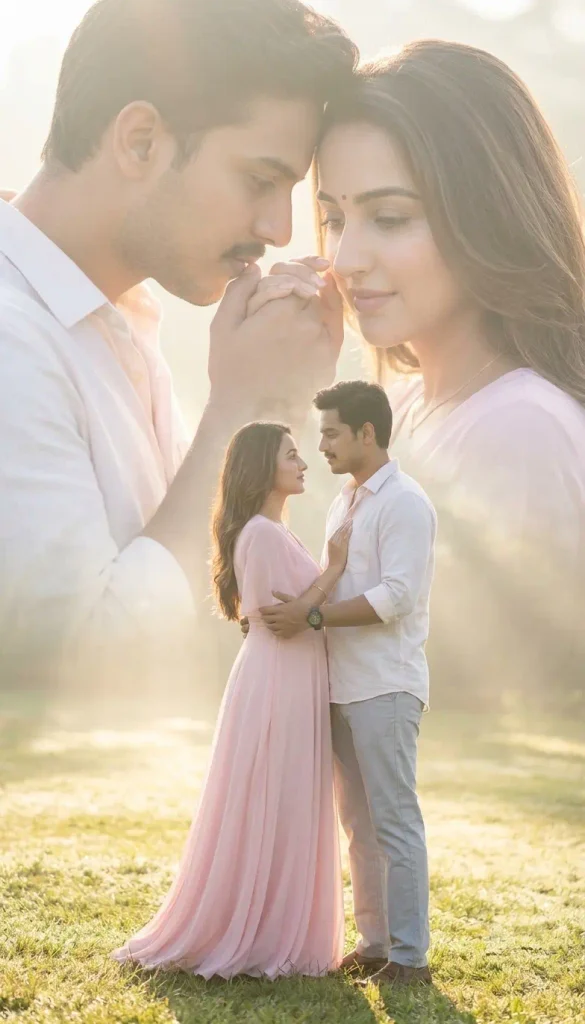
How to Customize These Couple Photo Prompts Easily
I give you prefect prompts are ready to use, but you can also change them according to your choice. It is very simple. If you want to change the clothes, just replace the dress or shirt description in the prompt with what you like. For example, you can write “red saree” or “black suit” instead of the given clothes. If you want a different background, simply remove the current background and write what you prefer like beach, garden, rainy street, or bedroom.
Further, you can also change the mood. Add words like “more romantic”, “soft glowing light”, “warm golden hour”, or “dark moody atmosphere” to get a different feeling. If you want to add something extra, just mention it clearly. For example, you can add “soft moonlight”, “falling flowers”, “gentle rain”, or “fairy lights” in the prompt.
After making small changes, paste the new prompt in Gemini and generate again. This way you can create many different versions from the same base prompt.
My Suggestion For Best Results
After trying these prompts many times, I found a few small tricks that make a big difference. Keep these in mind before you hit generate:
- Use clear, well-lit couple photos. A sharp, front-facing photo helps Gemini match both faces much better.
- Fix face mismatch with one extra line. If the faces don t match perfectly, add this to your prompt: Keep both faces 100% exact from the reference image.
- Test both 4:5 and 9:16 aspect ratios. 4:5 works great for Instagram posts, while 9:16 looks better for Reels and Stories. Try both and see which one you like more.
- Edit in the same chat. You can easily change the clothes, background, or mood by simply telling Gemini in the same conversation. You don’t need to start over.
Final Thoughts
I really enjoyed making these retro and double-exposure couple photos with Google Gemini, and I think you will too. My advice is to start with the first prompt, the Intimate High-Contrast Double Exposure, because it gives the most striking result. Once you get the hang of it, try the retro and dreamy styles as well.
If you create something beautiful, share your experience in the comments. I would love to hear which prompt worked best for you. thanks for reading.
Read More: Cinematic Rain AI Photo Prompts


Pingback: Trending 3 Cute Chibi Collage Girl Photos Prompt - Prompt Insta